View and Edit Communication Preferences
View Communication Preferences
In AgentView The graphical user interface of the CMP that is typically used by Customer Service Agents to access CMP customer and billing data. In versions prior to CMP 8.0, this was called the CMP GUI., the communications preferences for a subscription A billing entity that incurs a charge. Examples include a network attached device whose usage you want to measure and charge for, or a monthly software subscription or an account In the Cloud Monetisation Platform, a billing entity that can be used to manage payments on one or more subscriptions or payments for services. An account can hold details such as payments or invoices. can be viewed in the Comms > Preferences lower panel in the relevant Summary screen.
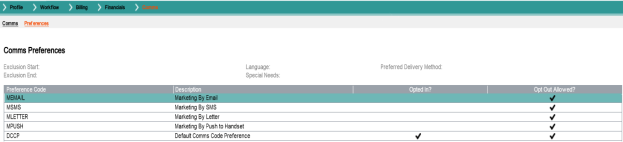
The panel displays the customer In the context of the Cloud Monetisation Platform, an individual or organisation who has signed an agreement to take goods and services from a service provider. A customer receives a bill associated with one or more subscriptions, and can be a single end user or a large company with many subscriptions assigned to one agreement. preferences as follows:
- Exclusion Start and Exclusion End: The start and end times if an exclusion period is set.
- Language: The customer's preferred language, if set, for example English or Spanish.
- Special Needs: Special needs preferences such as Braille.
- Preferred Delivery Method: If the customer has a preferred delivery method, for example SMS Short Message Service.
A text messaging service component of most mobile telephone systems. SMS uses standardized communication protocols to enable mobile phone devices to exchange short text messages., EMAIL, PUSH etc.
The communications preferences are listed under the following column headings:
| Field | Description |
|---|---|
| Preference Code | The alphanumeric code for the preference. |
| Description | A brief meaningful description name for the preference, for example, Marketing by Email. |
| Opted In | A checkmark in this column indicates that the customer has opted to receive the communication. |
| Opt Out Allowed? | A checkmark in the column indicates that the customer is allowed to opt out of receiving the communication. |
Opt In to Communications
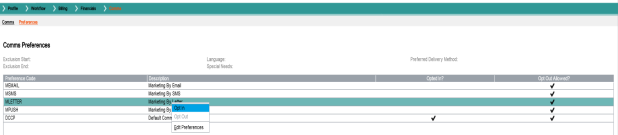
If a customer wants to opt in or out of a communication, the agent can set this up in the Comms Preferences pane by right-clicking a preference, choosing the appropriate Opt In or Opt Out option and confirming their action:
Edit Communication Preferences
Customer communication preferences can be edited in the Edit Preferences pop-up, which is access via the Edit Preferences right-click option in the Comms Preferences panel.
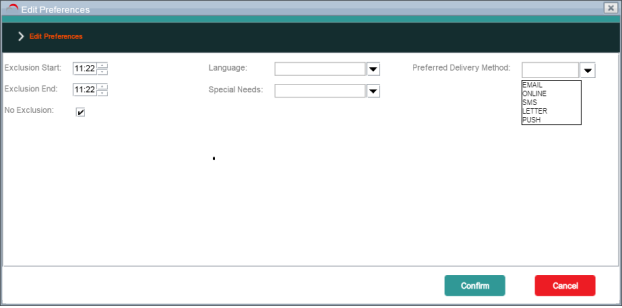
The pop-up contains the following options:
| Field | Setting Description |
|---|---|
| Exclusion Start spin-box | If an exclusion is configured for the account/subscription, the time the exclusion starts. |
| Exclusion End spin-box | If an exclusion is configured for the account/subscription, the time the exclusion ends. |
| No Exclusion checkbox | A checkmark in this column indicates that no exclusion period is set. |
| Language drop-down | The preferred language for communications, for example, English or Spanish. |
| Special Needs drop-down | Any special needs accommodations required for communications, for example, Braille or Large Print. |
| Preferred Delivery Method | The preferred delivery method for communications, for example, letter, email, online, SMS, push notification or external system. |